
Free GoHighLevel Conversation AI Setup Cheat Sheet
The 5 settings most agencies skip — and exactly how to set them up for maximum results.
Enter your email to get instant access to the PDF.
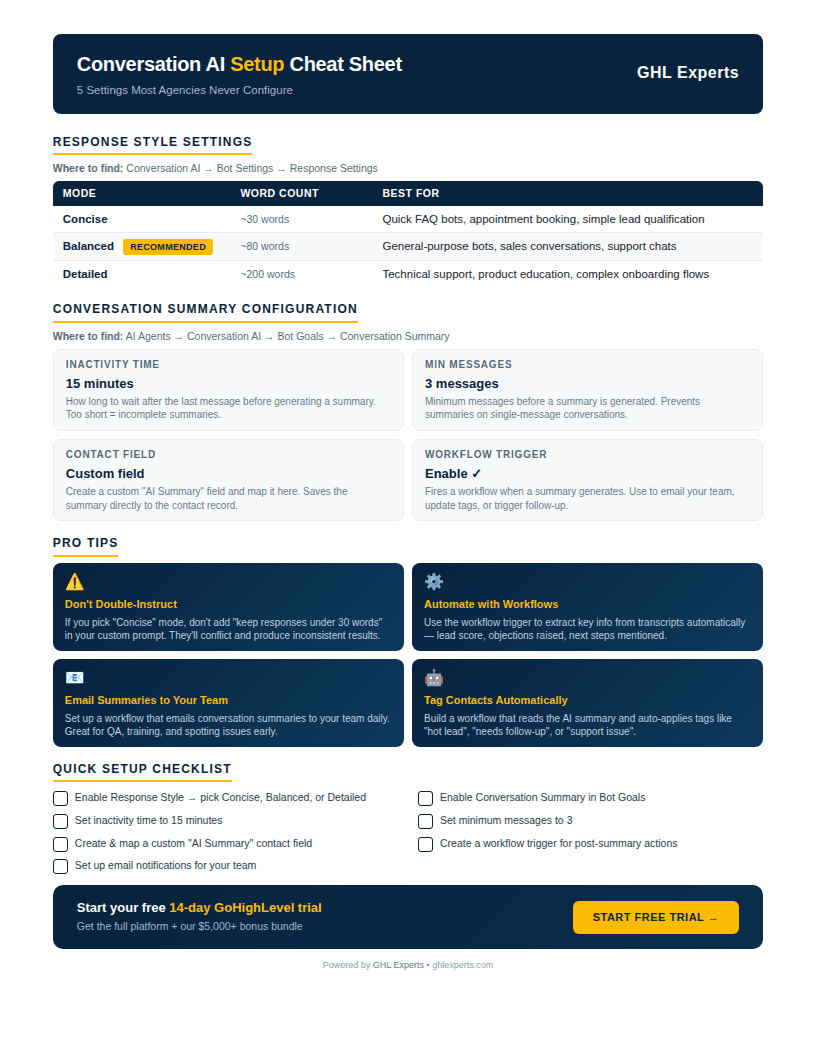
What's Inside
- 1
Response Style Settings
Choose between Concise, Balanced, or Detailed modes so your AI bot matches the tone and depth your leads expect.
- 2
Summary Configuration
Set up automatic conversation summaries with the right inactivity time, message count, and contact field mapping.
- 3
Pro Tips from the Field
Avoid the #1 mistake agencies make, plus workflows that auto-tag leads and email summaries to your team.
- 4
Quick Setup Checklist
A 7-step checklist you can follow in under 10 minutes to fully configure Conversation AI the right way.
Everything You Need to Configure Conversation AI
Choose between Concise, Balanced, or Detailed modes so your AI bot matches the tone and depth your leads expect.
Set up automatic conversation summaries with the right inactivity time, message count, and contact field mapping.
Avoid the #1 mistake agencies make, plus workflows that auto-tag leads and email summaries to your team.
A 7-step checklist you can follow in under 10 minutes to fully configure Conversation AI the right way.
Ready to Set Up GoHighLevel the Right Way?
Start your free 14-day trial and get our $5,000+ bonus bundle to fast-track your setup.
No obligations, no contracts, cancel anytime